
前言
今天开始正式进入主题制作了。在主题制作前我们需要先准备好一个完整的html网站的页面,目前我只准备了首页,后面的页面我会边做边写。首先来看看首页长什么样子。
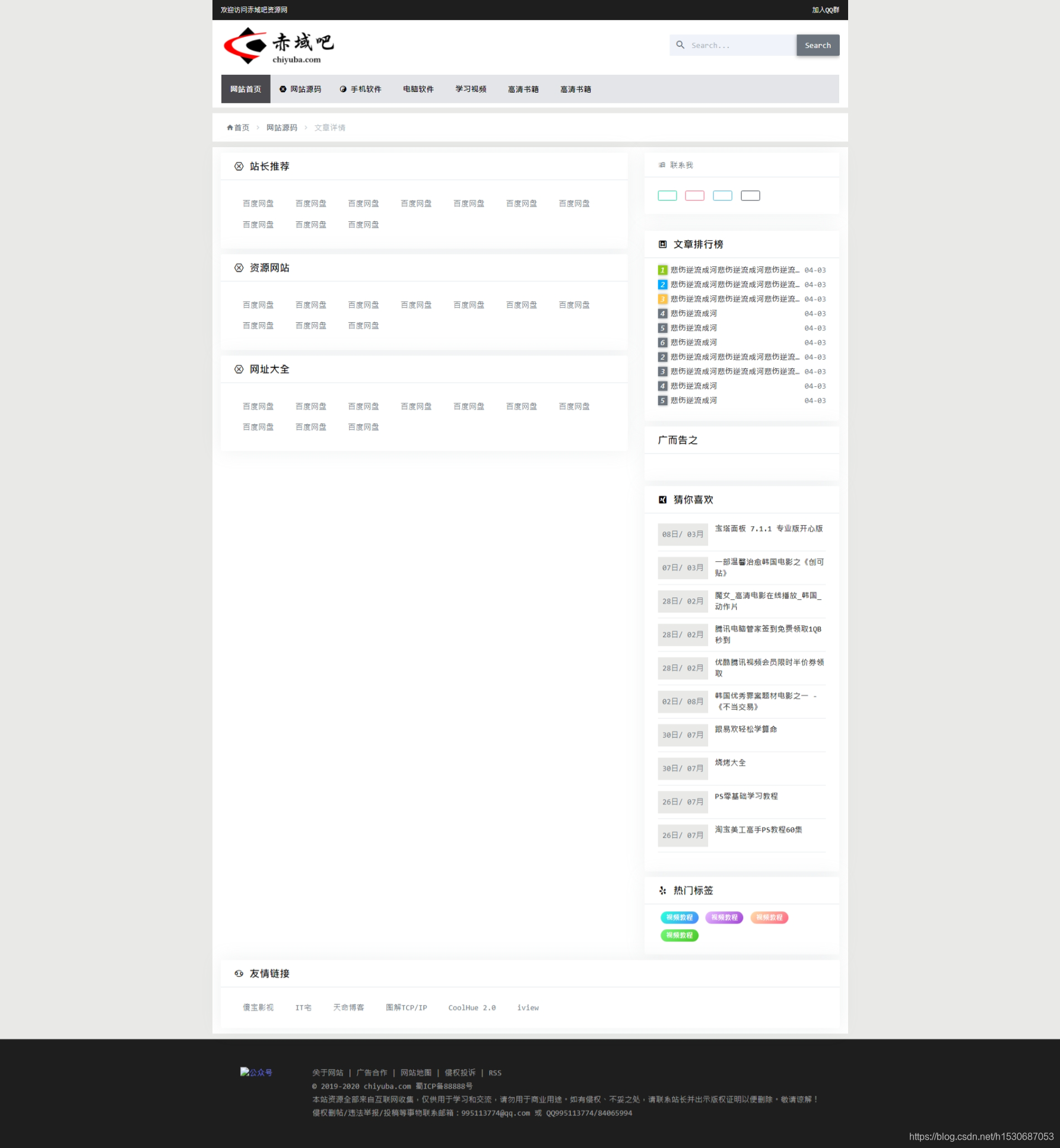

这个页面来自于我的另一个网站chiyuba.com友情链接部分,这个教程我会慢慢改造成一个导航网站。下面我们开始制作这个页面把。
正文如下
1. 先给大家看一下我最后拆分的效果把!可能不是最好的方式,后面也可能做调整,但是目前就是这么拆分的。
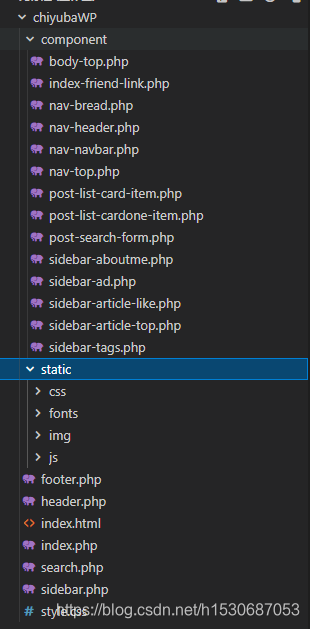
2. 首页拆分(index.html)
首页主要拆分了四块: index.php/header.php/footer.php/sidebar.php/
index.php为主要的框架模块
header.php为公共的头文件
footer.php 为公共的底部文件
sidebar.php为侧边栏模块
首页其他的小模块均放在component下。下面来看看具体的代码吧,这次只是将静态网页做了拆分,并没有显示实际数据,例如导航栏等地方的数据都是假的,下一篇文章我就会将静态数据全部变成动态数据。
3. index.php代码
<!DOCTYPE html>
<html lang="zh">
    <head> <?php get_header(); ?> </head>
    <body>
        <!-- 头部 -->
        <?php get_template_part('component/nav-header'); ?>

        <!-- 导航 -->
        <main class="hr-main__wrapper">
            <div class="container">
                <div class="row">
                    <div class="col-lg-8 hr-main">
                        <?php get_template_part('component/post-list-card-item'); ?>
                        <?php get_template_part('component/post-list-card-item'); ?>
                    </div>
                    <aside class="col-lg-4 hr-aside">
                    <?php get_sidebar(); ?>
                    </aside>

                    <?php get_template_part('component/index-friend-link'); ?>
                </div>

            </div>
        </main>
        <?php get_footer()?>

    </body>
</html>
4. header.php代码
<meta charset="UTF-8">
<!-- 取消百度转码 -->
<meta http-equiv="Cache-Control" content="no-siteapp">
<meta http-equiv="Cache-Control" content="no-transform">
<meta name="viewport" content="width=device-width, initial-scale=1.0">
<!-- 优先渲染方式 -->
<meta http-equiv="X-UA-Compatible" content="chrome=1">
<meta http-equiv="X-UA-Compatible" content="ie=edge">
<title>赤域吧资源网</title>
<meta name="keywords" content="资源网,赤域资源网,赤域资源吧">
<meta name="description" content="吃鱼资源网">
<link rel="shortcut icon" href="/favicon.ico" type="image/x-icon" />

<!-- 使用用于百度移动搜索适配 -->
<meta http-equiv="mobile-agent" content="format=html5; url=https://chiyuba.com">
<meta http-equiv="mobile-agent" content="format=xhtml; url=https://chiyuba.com">
<meta name="author" content="469886818@qq.com">
<!-- 网站采用什么制作 -->
<meta name="generator" content="本网站采用基于MIP规范的MIPCMS制作而成。" />
<!-- 首页使用website,文章页使用article -->
<meta property="og:type" content="website">
<meta property="og:title" content="赤域吧">
<meta property="og:site_name" content="页面所在的网站名">
<meta property="og:description" content="赤域资源网">
<meta property="og:url" content="当前内容链接">
<meta property="og:image" content="logo图">
<!-- 当前栏目 -->
<meta property="og:category" content="首页" />
<!-- 当前页面发布者,一般网址 -->
<meta property="article:publisher" content="https://itzhai.cn" />
<meta property="article:published_time" content="发布时间" />
<meta property="article:tag" content="文章标签" />
<link rel="stylesheet" type="text/css" href="<?php bloginfo("template_url"); ?>/static/css/reset.css" />
<link rel="stylesheet" type="text/css" href="<?php bloginfo("template_url"); ?>/static/css/app.min.css" />
<link rel="stylesheet" type="text/css" href="<?php bloginfo("template_url"); ?>/static/css/icons.min.css" />
<link rel="stylesheet" href="https://unpkg.com/swiper/css/swiper.min.css">
<link rel="stylesheet" type="text/css" href="<?php bloginfo("template_url"); ?>/static/css/main.css" />
<!--[if lt IE 9]>
    <script src="http://cdn.static.runoob.com/libs/html5shiv/3.7/html5shiv.min.js"></script>
<![endif]-->
<script src="https://unpkg.com/swiper/js/swiper.min.js"> </script>
5. footer.php代码
<footer class="hr-footer__wrapper">
<div class="container">
    <article class="hr-footer__main">
        <div class="hr-footer__left d-none d-sm-block">
            <a href="#" title="公众号">
                <img src="./img/icon.png" alt="公众号">
            </a>
        </div>

        <div class="hr-footer__right">
            <p class="hr-footer__top">
                <a href="" title="">关于网站</a> |
                <a href="" title="">广告合作</a> |
                <a href="" title="">网站地图</a> |
                <a href="" title="">侵权投诉</a> |
                <a href="" title="">RSS</a>
            </p>
            <p class="hr-footer__midone">
                © 2019-2020 chiyuba.com
                <a href="#">蜀ICP备88888号</a>
            </p>
            <p class="hr-footer__midtwo">本站资源全部来自互联网收集,仅供用于学习和交流,请勿用于商业用途。如有侵权、不妥之处,请联系站长并出示版权证明以便删除。敬请谅解!</p>
            <p class="hr-footer__btm">侵权删帖/违法举报/投稿等事物联系邮箱:995113774@qq.com 或 QQ995113774/84065994</p>
        </div>

    </article>
 </div>
 </footer>
 <script>
    var mySwiper = new Swiper('.swiper-container', {
        paginationClickable: '.swiper-pagination',
        spaceBetween: 30,
        effect: 'cube',
        loop: true,
        autoplay: 1000,
        loopedSlides: 5,
        // 如果需要分页器
        pagination: {
            el: '.swiper-pagination',
        },
        // 如果需要前进后退按钮
        navigation: {
            nextEl: '.swiper-button-next',
            prevEl: '.swiper-button-prev',
        },
        // 如果需要滚动条
        scrollbar: {
            el: '.swiper-scrollbar',
        }
    })
</script>
6. sidebar.php代码
<?php get_template_part('component/sidebar-aboutme'); ?>

<?php get_template_part('component/sidebar-ad'); ?>

<?php get_template_part('component/sidebar-article-top'); ?>

<?php get_template_part('component/sidebar-article-like'); ?>

<?php get_template_part('component/sidebar-tags'); ?>
7. 其他部分代码
<!-- nav-navbar.php -->
<header class="hr-header__wrapper">
    <div class="container">
        <div class="hr-header__main">
            <button class="button-menu-mobile open-left disable-btn">
                <i class="fas fa-menu"></i>
            </button>
            <div class="hr-top__logo">
                <h1 class="hr-hidden">赤域吧-赤域资源网</h1>
                <a href="" title="赤域吧">
                    <img src="<?php bloginfo("template_url"); ?>/static/img/logo.png" alt="logo">
                </a>
            </div>
            <div class="hr-top__search">
                <?php get_template_part('component/post-search-form'); ?>
            </div>
        </div>
    </div>
</header>
<nav class="hr-nav__wrapper">
    <div class="container">
        <div class="navbar navbar-dark navbar-expand-lg topnav-menu">
            <div class="collapse navbar-collapse active" id="topnav-menu-content">
                <ul class="navbar-nav hr-navbar__nav">
                    <li class="nav-item hr-nav__item hr-nav__active">
                        <a href="index.html" class="nav-link hr-nav__link" title="网站首页">网站首页</a>
                    </li>
                    <li class="nav-item hr-nav__item dropdown">
                        <a class="nav-link hr-nav__link dropdown-toggle arrow-none" href="#" role="button" data-toggle="dropdown" aria-haspopup="true" aria-expanded="false">
                            <i class=" mdi mdi-xamarin mr-1"></i>网站源码 <div class="arrow-down"></div>
                        </a>
                        <div class="dropdown-menu" aria-labelledby="topnav-dashboards">
                            <a href="index.html" class="dropdown-item">Ecommerce</a>
                            <a href="dashboard-crm.html" class="dropdown-item">CRM</a>
                            <a href="dashboard-projects.html" class="dropdown-item">Projects</a>
                        </div>
                    </li>
                    <li class="nav-item hr-nav__item dropdown">
                        <a class="nav-link hr-nav__link dropdown-toggle arrow-none" href="#" role="button" data-toggle="dropdown" aria-haspopup="true" aria-expanded="false">
                            <i class="mdi mdi-yin-yang mr-1"></i>手机软件 <div class="arrow-down"></div>
                        </a>
                        <div class="dropdown-menu" aria-labelledby="topnav-dashboards">
                            <a href="index.html" class="dropdown-item">Ecommerce</a>
                            <a href="dashboard-crm.html" class="dropdown-item">CRM</a>
                            <a href="dashboard-projects.html" class="dropdown-item">Projects</a>
                        </div>
                    </li>
                    <li class="nav-item hr-nav__item ">
                        <a class="nav-link hr-nav__link dropdown-toggle arrow-none" href="#" role="button" data-toggle="dropdown" aria-haspopup="true" aria-expanded="false">
                            <i class="fas fa-music mr-1"></i>电脑软件 <div class="arrow-down"></div>
                        </a>

                    </li>
                    <li class="nav-item hr-nav__item ">
                        <a class="nav-link hr-nav__link dropdown-toggle arrow-none" href="#" role="button" data-toggle="dropdown" aria-haspopup="true" aria-expanded="false">
                            <i class="fas fa-music mr-1"></i>学习视频 <div class="arrow-down"></div>
                        </a>
                    </li>
                    <li class="nav-item hr-nav__item ">
                        <a class="nav-link hr-nav__link dropdown-toggle arrow-none" href="#" role="button" data-toggle="dropdown" aria-haspopup="true" aria-expanded="false">
                            <i class="fas fa-music mr-1"></i>高清书籍 <div class="arrow-down"></div>
                        </a>
                    </li>
                    <li class="nav-item hr-nav__item ">
                        <a class="nav-link hr-nav__link dropdown-toggle arrow-none" href="#" role="button" data-toggle="dropdown" aria-haspopup="true" aria-expanded="false">
                            <i class="fas fa-music mr-1"></i>高清书籍 <div class="arrow-down"></div>
                        </a>
                    </li>
                </ul>
            </div>
        </div>
    </div>
</nav>
<!--  post-list-card-item.php -->
<article class="card hr-flink__wrapper">
    <header class="card-header hr-article__title">
        <i class="mdi mdi-xamarin-outline"></i> 站长推荐
    </header>
    <section class="card-body">
        <a href="" class="btn btn-link">百度网盘</a>
        <a href="" class="btn btn-link">百度网盘</a>
        <a href="" class="btn btn-link">百度网盘</a>
        <a href="" class="btn btn-link">百度网盘</a>
        <a href="" class="btn btn-link">百度网盘</a>
        <a href="" class="btn btn-link">百度网盘</a>
        <a href="" class="btn btn-link">百度网盘</a>
        <a href="" class="btn btn-link">百度网盘</a>
        <a href="" class="btn btn-link">百度网盘</a>
        <a href="" class="btn btn-link">百度网盘</a>
    </section>
</article>
总结
时间关系,代码我并没有贴完,有哪个意思就行。我只是提供一个思路。
其中个人认为最重要的两个函数:
<?php bloginfo(“template_url”); ?> // 这是获取模板所在路径
<?php get_template_part(‘component/post-list-card-item’); ?> // 加载组件(component下所有的都可以看做是组件)方式
今天的文章就到这里,大家如果有不明白的地方可以留言。



评论
请先登录后发表评论